
Configure the Bot Network Policy
Important: Bot Defense self-service policy management is an early access feature.
When you configure Bot Defense as an inline solution where request traffic is routed from your network to Bot Defense, the Bot Network Policy provides routing information for traffic that Bot Defense determines to be legitimate human traffic and allows to continue to the origin server. You can configure the following routing types:
- Configure Upstream Routing when you want to send all human traffic to the same origin based on fully-qualified domain name of the request.
- Configure Manual Routing when you want to send human traffic to different origins depending on the inbound protocol and fully-qualified domain name of the request.
You must configure routing information for each application with an endpoint that is protected by Bot Defense.
Note: If you use Bot Defense in API mode, you don't need to configure the Bot Network Policy.
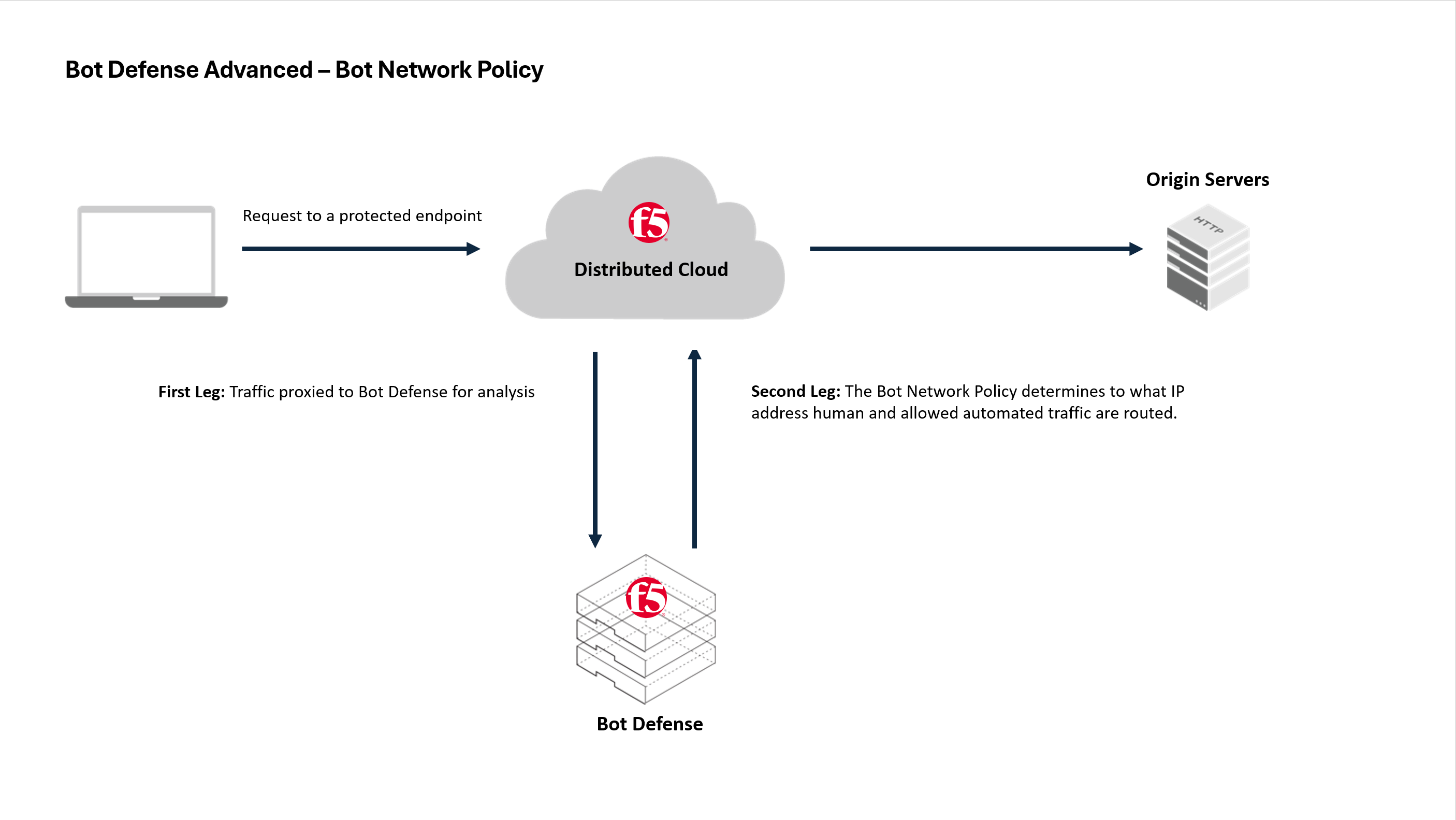
Figure: Bot Network Policy
Important: If you configure Bot Defense on an HTTP load balancer in Web App & API Protection, you must add the hostname of the HTTP load balancer to either the Upstream Routing section or Manual Routing section of your network policy. If you enabled Bot Defense on multiple load balancers, add an entry for each hostname.
To configure a network policy:
- From the Bot and Risk Management navigation menu, select Manage > Bot & Risk Policies and then select Network Policy.
- From the list of saved network policies, in the Actions column, select the Action menu (…) next to the policy you want to configure. If you're configuring a network policy for the first time, it's likely that you only have one saved policy version.
- Select Manage Configuration and then select Edit Configuration.
- To configure Upstream Routing, select Add and enter the fully-qualified domain name (FQDN) of the origin where you want to send requests that Bot Defense determines to be human traffic. For example, enter
www.internal.example.com. - To configure Manual Routing, select Add and configure the following settings:
- In the Inbound Protocol field, select the protocol for requests that are routed to Bot Defense (HTTP or HTTPS).
- In the Inbound FQDN field, enter the hostname and domain name for requests that are routed to Bot Defense. For example, enter
shop.example.com. - In the Outbound Protocol field, select the protocol for requests that Bot Defense allows to continue to the origin (HTTP or HTTPS).
- In the Outbound FQDN/IP field, enter the host and domain name or the IP address where you want to send requests that Bot Defense allows to continue to the origin. For example, enter
internal.example.com. - In the Outbound Port field, enter the outbound port number for requests that Bot Defense allows to continue to the origin.
- When you finish, select Apply. To add additional manual routing information, select Add.
- When you finish making changes, select Save Bot Network Policy.
- From the the Choose Action drop-down menu, select one of the following options:
- Save Final & Deploy: The policy version is saved and immediately deployed to the Bot Defense infrastructure that you select:
- In the Available Bot Infrastructure section, select the infrastructure where you want to deploy the policy.
- Select the checkbox to acknowledge the legal agreement.
- Select Save Final & Deploy.
Important: F5 recommends that you deploy and thoroughly test your policies in your Test environment before you move policy updates to your production environment.
- Save Final: The policy version is saved and added to the list of policy versions that you can deploy in your Bot infrastructure.
- Select the checkbox to acknowledge the legal agreement.
- Select Save Final.
- Save as Draft: You or another administrator can review and finalize this policy version later.
- Select the checkbox to acknowledge the legal agreement.
- Select Save as Draft.
Important: Other administrators can make changes that overwrite your saved draft. Before you deploy your policy update, review the policy settings to make sure they are correct.
- Save Final & Deploy: The policy version is saved and immediately deployed to the Bot Defense infrastructure that you select:
Next steps
After you finish configuring your network policy version and are ready to deploy the version, see Deploy policy updates.
Important: F5 recommends that you first deploy and test new policy versions in your test environment to make sure the system behaves as you intended before you deploy in a production environment. For information, see Test Bot Defense.